 BendUnfold
Sheet Metal Bend Calculator · DIN 6935 & K-Factor · Press Brake
Flat pattern, bend lines and tonnage – in seconds.
BendUnfold calculates the developed length (flat pattern) and bend deduction of your sheet metal parts according to DIN 6935 or a custom K-factor, shows every bend line for your press brake backgauge, and exports a 1:1 DXF blank directly for laser cutting.

Free · For iPhone and iPad (iOS / iPadOS 18+) · English & German · 100% offline & no account required
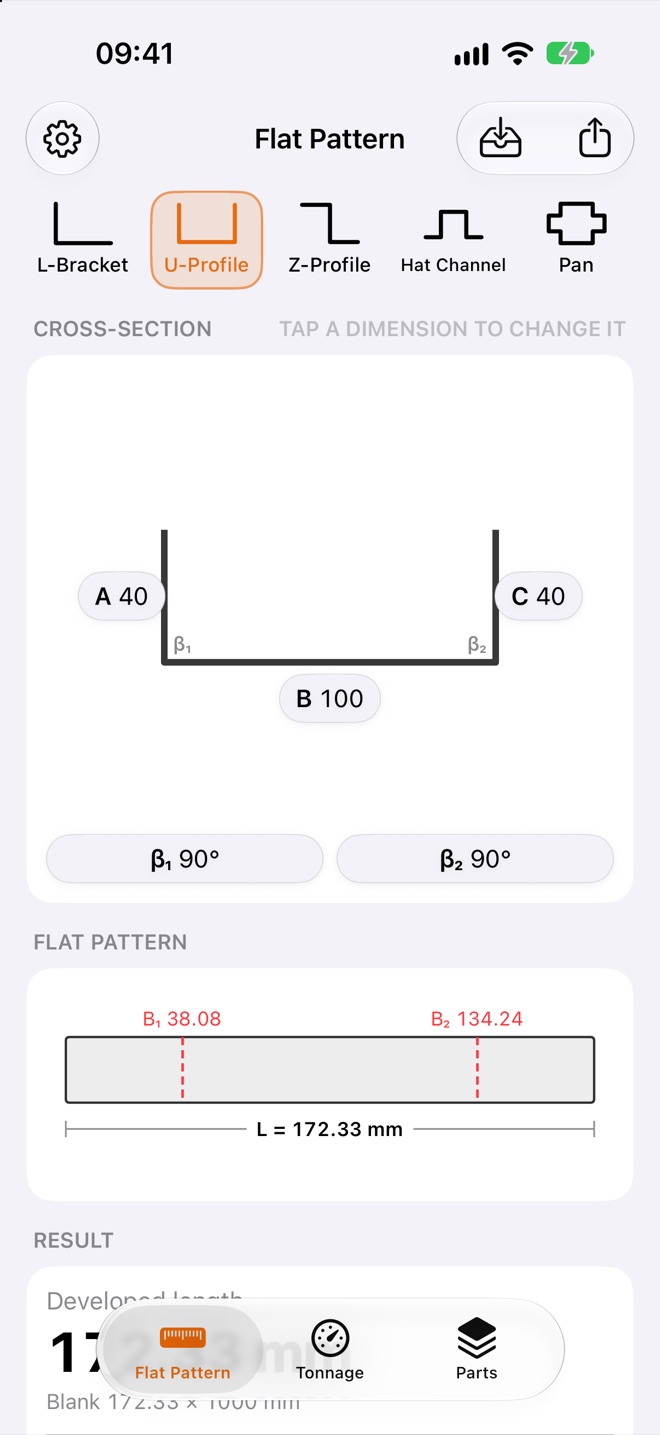

At a Glance: What is BendUnfold?
BendUnfold is a purpose-built shop floor calculator for sheet metal workers, press brake operators, fabricators, welders, apprentices and workshop engineers on iPhone and iPad. Instead of looking up tables or wrestling with spreadsheets, you tap dimensions directly on the profile sketch and immediately get the flat pattern length, the backgauge bend line sequence, the required bending force, plus a 1:1 DXF file for your laser cutter and an A4 PDF production sheet.
Built for the Shop Floor & Job Preparation
Tap Dimensions on Sketch
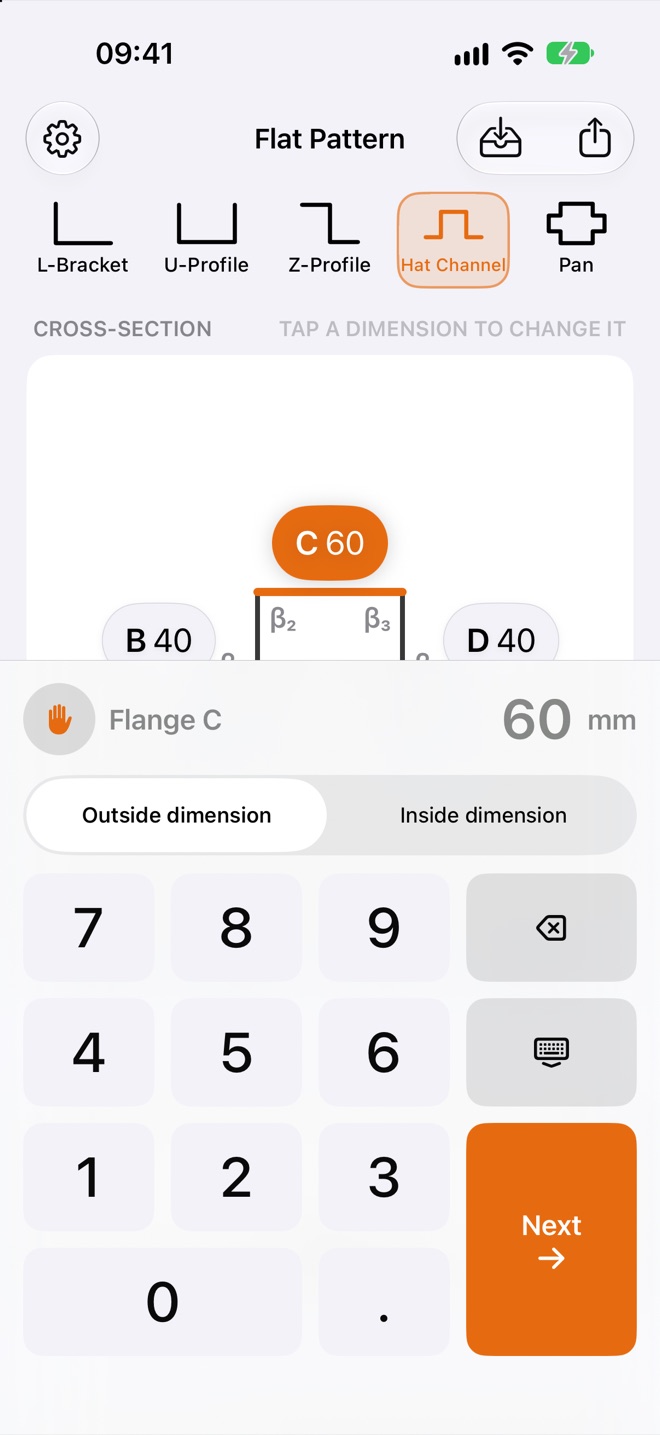
Tap any flange label directly on the drawing and enter your value. Switch between Outside dimension or Inside dimension per flange – the app converts automatically.
DIN 6935 & K-Factor
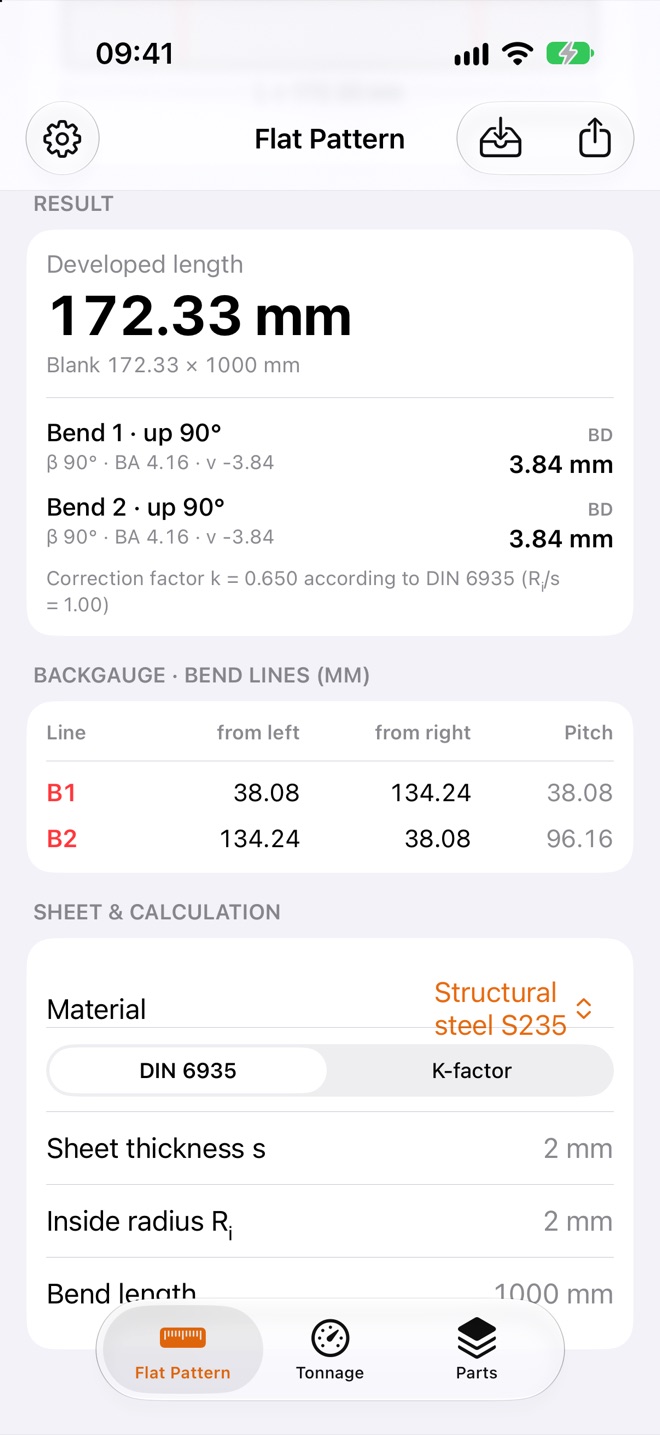
Developed length, correction factor k, bend allowance and compensation value v (bend deduction) per standard – or with your own custom K-factor.
Made for the Press Brake
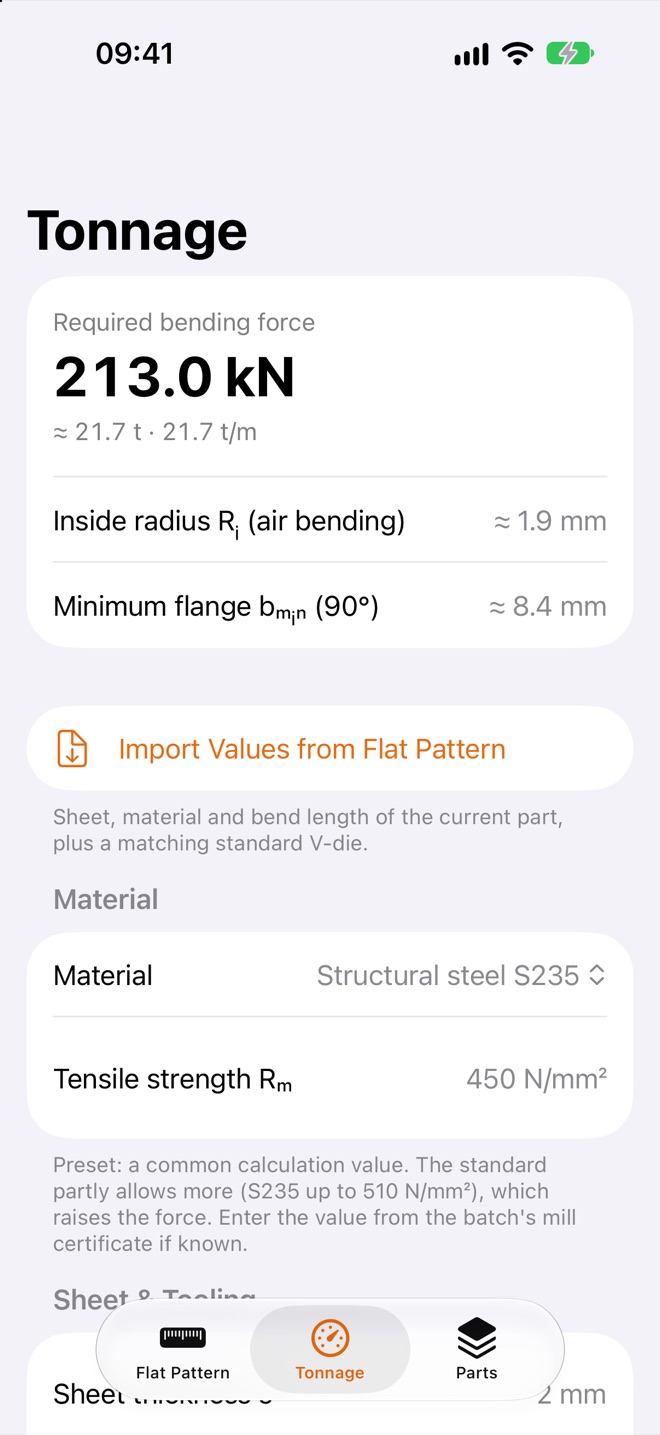
Backgauge dimension chain (from left, from right, pitch) plus a Tonnage calculator for air bending with required bending force, V-die opening, inside radius and minimum flange.
1:1 DXF & PDF Export
Ready-to-cut 1:1 DXF blank (AutoCAD R12) for your laser controller and an A4 PDF production sheet via AirDrop, Mail or Files.
Glove Mode
Oversized keypad buttons (66 pt), enlarged dimension badges and strong haptic feedback – built to be operated with work gloves right at the machine.
Built-in Guide
On first launch, a step-by-step guide explains every feature – available any time via Settings › Show Guide.
100% Offline & Private
Works in any workshop without cellular reception or Wi-Fi. No login, no cloud requirement, no ads and zero data collection.
Five Profile Templates – From L-Bracket to Sheet Metal Pan
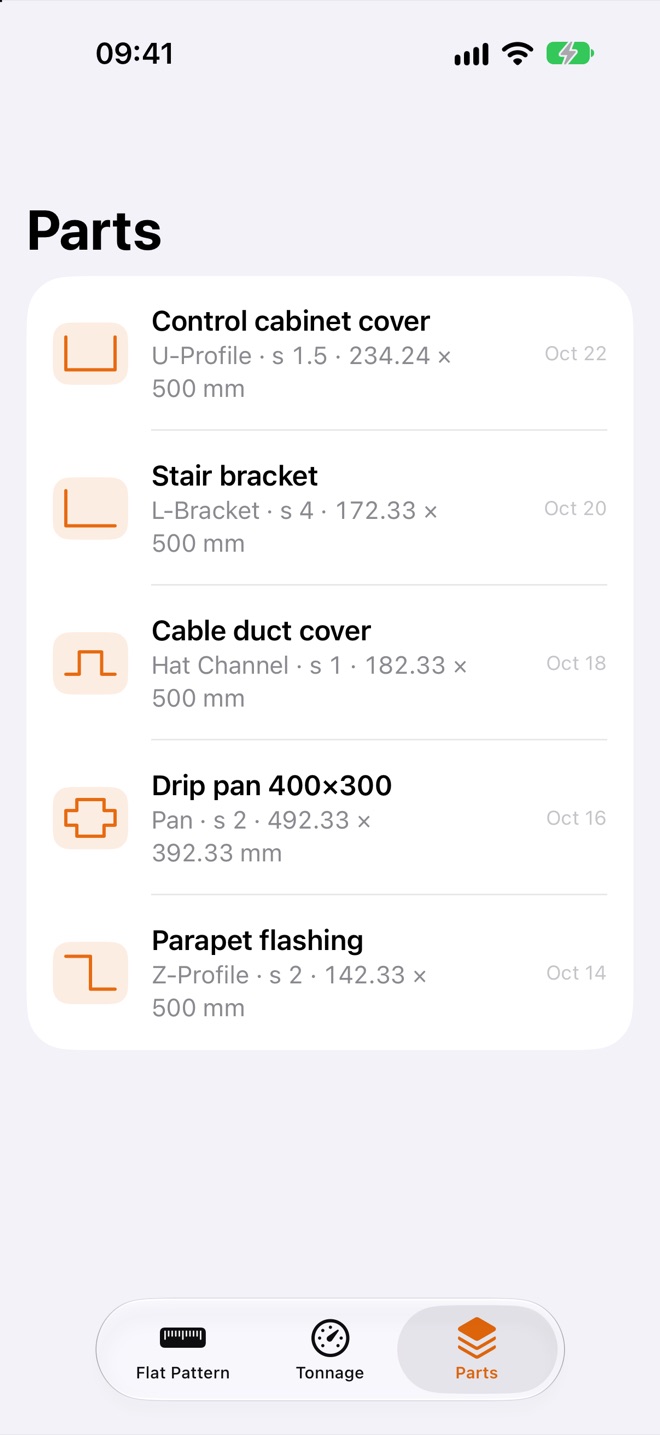
All five standard sheet metal profiles are one tap away in the template bar. When switching profiles, your sheet thickness, inside radius, material and calculation method are preserved:
| Profile Template | Flanges & Bends | Typical Use & Highlight |
|---|---|---|
| L-Bracket | Flanges A, B · 1 bend | Angle brackets, stops, corner guards (opening angle β freely adjustable) |
| U-Profile | Flanges A, B, C · 2 bends | Channels, enclosures, covers with two same-direction bends |
| Z-Profile | Flanges A, B, C · 2 bends | Counter-bends (up/down), wall flashings, brackets, offset mounts |
| Hat Channel | Flanges A to E · 4 bends | Stiffener profiles, cable channels, substructures (up, down, down, up) |
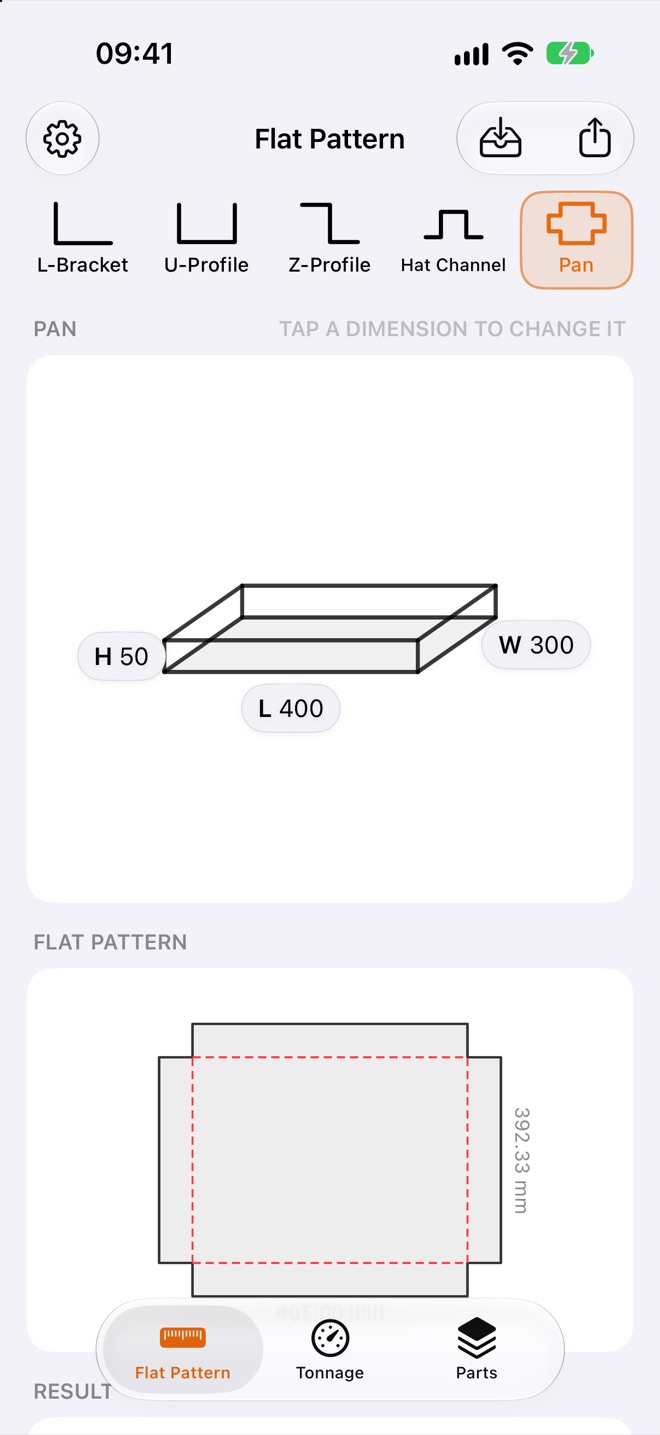
| Pan | Base L × W, Height H · 4 × 90° | Drip pans, trays, covers, housings – calculates the complete cross blank with automatic corner notches |
Comparison: Handbook & Spreadsheets vs. BendUnfold
| Shop Floor Task | Traditional (Tables / Excel) | With BendUnfold (iPhone & iPad) |
|---|---|---|
| Inside dimensions on drawing | Error-prone manual conversion to outside dimensions | Toggle each flange individually between Outside dimension and Inside dimension |
| Setting the backgauge | Manually adding half compensation value v/2 for every bend | Complete backgauge table (from left, from right, pitch) ready to read, valid from an unbent sheet edge |
| Bending a sheet metal pan | Calculating overall blank and corner notches separately by hand | Full cross blank and corner notch n × n calculated automatically (cut slightly further for clean corners) |
| Laser cutting blank | Waiting for the CAD office to redraw a simple 2D flat pattern | Send a 1:1 DXF (AutoCAD R12) directly from the app via AirDrop or Mail |
Technical Background: How BendUnfold Calculates
1. Developed Length & Bend Deduction (DIN 6935 & K-Factor)
During bending, the neutral axis shifts toward the inside of the bend. From the ratio of inside radius Ri to sheet thickness s, BendUnfold determines the DIN 6935 correction factor k, the bend allowance BA and the compensation value v (where bend deduction BD = −v):
Developed Length L = Σ Outside Flange Dimensions + Σ v
Calculations are checked against the DIN 6935 formulas, online calculators and table values (example: U-Profile 40 × 100 × 40 mm, s = 2 mm, Rᵢ = 2 mm → developed length L = 172.33 mm, bend lines B₁ = 38.08 mm, B₂ = 134.24 mm). The app also warns you if a flange is shorter than the minimum V-die flange length, if radii are too tight (Rᵢ/s < 0.5), or if angles are below 30°.
2. Tonnage (Air Bending), V-Die & Minimum Flange
In the Tonnage tab, BendUnfold calculates the required bending force for air bending on the press brake in kN, metric tons (t) and t/m from sheet thickness s, bend length, V-die opening V and tensile strength Rm, along with the resulting air-bend inside radius and minimum flange length:
Minimum Flange bₘᵢₙ = 0.7 · V | Air-Bend Radius Rᵢ ≈ 0.16 · V (Steel) / 0.22 · V (Stainless) / 0.14 · V (Aluminum)
7 built-in materials (Rm preset to a common calculation value; the standard partly allows more, which raises the force, freely editable): Cold-rolled steel DC01 (410 MPa), structural steel S235 (450 MPa), structural steel S355 (630 MPa), galvanized steel DX51D+Z (500 MPa), stainless steel 1.4301 / AISI 304 (700 MPa), stainless steel 1.4571 / AISI 316Ti (690 MPa) and aluminum AlMg3 / EN AW-5754 (250 MPa).
3. 1:1 DXF Flat Pattern Directly for Laser Controllers
The exported DXF flat pattern uses the AutoCAD R12 (AC1009, units in mm) format with three cleanly separated layers for CAM systems that read DXF R12:
OUTER_CUT– closed 1:1 outer contour of the flat blankBEND_LINES– red dashed bend lines at their exact positionsTEXT_INFO– bend direction, angle and radius per line (e.g.UP 90° R2)
Frequently Asked Questions
Do I enter the bend angle or the opening angle?
You enter the opening angle β between the flanges (90° = right angle, 180° = flat sheet). To prevent any shop-floor confusion, the keypad simultaneously displays the bend angle α = 180° − β. Below 90°, flange dimensions follow DIN 6935: they are measured tangentially to the outside of the bend, not to the sharp corner, and the app points this out. The DIN formula applies from 15°.
Can I enter inside dimensions directly from a blueprint?
Yes. Tap the dimension directly on the profile sketch and toggle between “Outside dimension” and “Inside dimension” in the keypad. BendUnfold automatically converts inside measurements to outside dimensions.
Does DIN 6935 also apply to stainless steel and aluminum?
DIN 6935 covers flat steel products, and the calculation can also be used for stainless steel. A K-factor proven on your own machine is often more accurate there. When you select aluminum, BendUnfold automatically notifies you and recommends switching to K-factor mode, where you can enter your machine- and material-specific K-value.
How do I save a part?
Tap the tray icon at the top right › “Save Part” › enter a name. All parts are listed in the “Parts” tab and can be searched. Tap to open, swipe left to delete.
Which languages?
English and German, following your iPhone’s language. Change it per app in iOS Settings › Apps › BendUnfold › Language.
Will BendUnfold stay free?
Everyone who downloads BendUnfold before paid features are introduced keeps all features free for life – even after reinstalling with the same Apple Account.
Download now and keep all features free for life
Get BendUnfold free for iPhone and iPad – built for sheet metal fabricators, press brake operators, welders and apprentices.